
Audio Post-Production Delivery
The following specs are preferred and will help ensure fast turn around for your project and prevent additional expenses.
If you have any questions about any of these specs, please contact us.
File Delivery
Dropbox, WeTransfer, or other file sharing services are acceptable for file delivery, however, we do NOT accept files through Google Drive as we’ve had too many issues with deliveries in the past.
If you need an alternate method from Google Drive, please let us know and we can get you a free upload link for your project.
Please share a Folder link and not the folder itself when using Dropbox. Please name the folder along these lines:
YOUR NAME/ORGANIZATION NAME - PROJECT NAME - Version
General Asset Naming
Please make sure all AAF’s, OMF’s, and/or Reference videos are appropriately and consistently labeled across all files.
Example: ”ProjectName_Version_YYYYMMDD”
AAF/OMF Delivery Specs
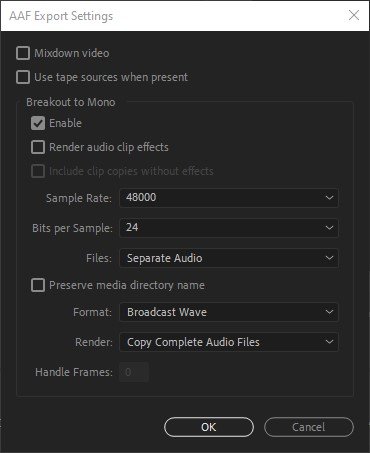
AAF with embedded media is preferred.
OMF Version 2.0 must have media separate—This avoids size limits and preserves metadata we might need.Time code format must match video
48 kHz Sample Rate, 24 bit
Broadcast .WAV files - No AIFC files
Please “Copy Complete Audio Files”.for projects 20 minutes or less. For longer projects, please provide frame handles of no less than 300 frames.
Tracks within the AAF or OMF should be labeled and organized preferably in the following order:
Narration/VO, Dialogue, Room Tone, SFX and/or Foley, MusicPlease make sure to breakout tracks to Mono when exporting
A reference video should be exported separately (see below for preferred specs)
If exporting from Premiere, the AAF or OMF dialogue should look something like this:
Notes for Adobe Premiere Users
The following have been known to create errors in AAF’s. Please avoid these things when exporting:
Nested Sequences
Special characters, like /, >, <, ®, and ü, Ø, Æ, Å.
Using Merged Clips in the timeline.
If a clip has a transition at both the In and Out points, the clip must be at least the same length as both transitions combined.
Please export an AAF & OMF for our first time project together. In some instances we have had issues with one or the other format from some clients with different versions of Premiere. Delivering both for a first project often helps in speeding up the turnaround. If you are new to exporting AAF/OMF files, there is a video tutorial at the bottom of this page that may help.
Additional OMF/AAF Notes:
Please do not send embedded OMF files — exporting audio separately is always preferred with OMF files. AAF files should have audio embedded.
Please make sure picture is locked. Re-conforming audio for picture changes will result in additional delivery time and charges.
Please avoid processed effects or merged audio tracks. Dialogue should be raw production sound. If you have a desired effect for a sound, please make sure to include the original raw sound on a muted track.
Please include all microphone tracks from the original production. Unused audio may be placed on muted tracks.
Dialogue, Music, and FX should be on their own unique tracks. Please use a separate track each time your source changes. (ex. 8 different talking head segments should use at least 8 different tracks—one per subject)
Please refrain from using MP3 sources for music and SFX as the mixing & mastering process may emphasize digital artifacts in these files.
Please remove any unwanted and/or unused audio such as alternate music tracks from your project before exporting. Only send audio that is part of the final program.
Please deliver room tone sync'ed with each scene/sequence when available.
Video Delivery Specs
Please export the reference video from the same project/session as the OMF/AAF to ensure the picture matches the audio you are sending. Also, please maintain consistent file naming between the video file and the OMF/AAF in terms of versioning.
Quicktime video in 1080p at your timeline’s native frame rate is preferred.
h.264 or Apple ProRes. Compressed video is fine for internet file transfers, but uncompressed video is preferred when possible
Helpful Additions in the Video:Embedded audio guide track / rough mix.
Window burn of the program’s visible time code near bottom left corner or in the black is preferred. A short indicator of edit version is helpful, too.
Academy leader at 00:59:52;00 with 2-pop exactly 2 seconds before the hour at 00:59:58;00 for broadcast projects.
Single pop 30-60 seconds after the end of the program for broadcast projects.
Additional Delivery Information
Please include any additional relevant notes, logs, and scripts with your audio and video assets.
These may be .txt or .pdf files. No .doc files, please.
Please also include your audio delivery specs or requirements if they differ from ATSC A/85:2013.
Attn: Adobe Premiere Users
If you are new to exporting AAF/OMF files, here is a helpful guide. Please make sure to adjust settings to match our spec's as listed above. Thanks!